Animated preview of the BentoMind chat: reading an attached PDF offline, summarizing a chat shared from
WhatsApp, an offline question, a nearby places search using OpenStreetMap, and a calculator tool call, each
with live speed, CPU, memory and temperature readings.
9:41
MiniCPM5 1B
13.9tok/s3%1.37GB35.8°C
Rental-Agreement.pdf1 page · read on this phone
List the dates, amounts and to-dos.
MiniCPM5 1B
Rent: ₹28,000 a month, due by the 5th Deposit: ₹84,000, refunded within 30 days Term: 1 Oct 2026 to 31 Aug 2027 Also: ₹2,500/month maintenance, rent +5% on renewal
64 tok · 8.5 tok/s · TTFT 2.4 s
Message…
Runs entirely on-device. Responses may be inaccurate.
Powered by open models viallama.cpp
Qwen
MiniCPM
Gemma
Llama
LFM
SmolLM
Phi
DeepSeek-R1
Granite
Qwen
MiniCPM
Gemma
Llama
LFM
SmolLM
Phi
DeepSeek-R1
Granite
見 See it in action 実演
Real recordings, on a real phone.
Screen recordings of BentoMind running Qwen3.5 2B on an iQOO Z10 (8 GB RAM). No cloud, no mock-ups.
Ask anything
Type a question and the answer streams in, generated by the phone's own processor.
Real speed, not edited.
Ask your PDFs
Attach a PDF and ask about it. The text is read on the phone and never uploaded.
About 47 s of thinking trimmed.
Talk, don't type
Speak your question; it's transcribed on the device, then answered like any chat.
A pause before sending trimmed.
新 New · Attach & share 新機能
Hand it a PDF, a photo or a whole chat.
Attach files from the + button, or share them from any app. Documents are read on your phone, so with an on-device model your lease never leaves it.
PDFs and text files, read on your phone
BentoMind pulls the text out of a PDF, a .txt, a CSV or code right on the device, so even an offline model can summarize a lease, a bill or a report.
Offline · any model“What's the notice period, and when is rent due?”
Share from any app
Tap Share → Ask BentoMind in WhatsApp, Gallery, Files or Chrome, or select text anywhere. Then one tap: Summarize, Draft a reply, Dates & tasks, Explain or Translate.
No SMS or storage permission“Summarize this group chat. Anything for me?”
Photos for vision models
Ask about a screenshot, a menu or a whiteboard with a vision model you connect (Ollama, LM Studio or any OpenAI-compatible API). On-device models say honestly when they can't see.
Remote vision model“What does this sign say in English?”
Share
Ask BentoMindMessagesMailDrive
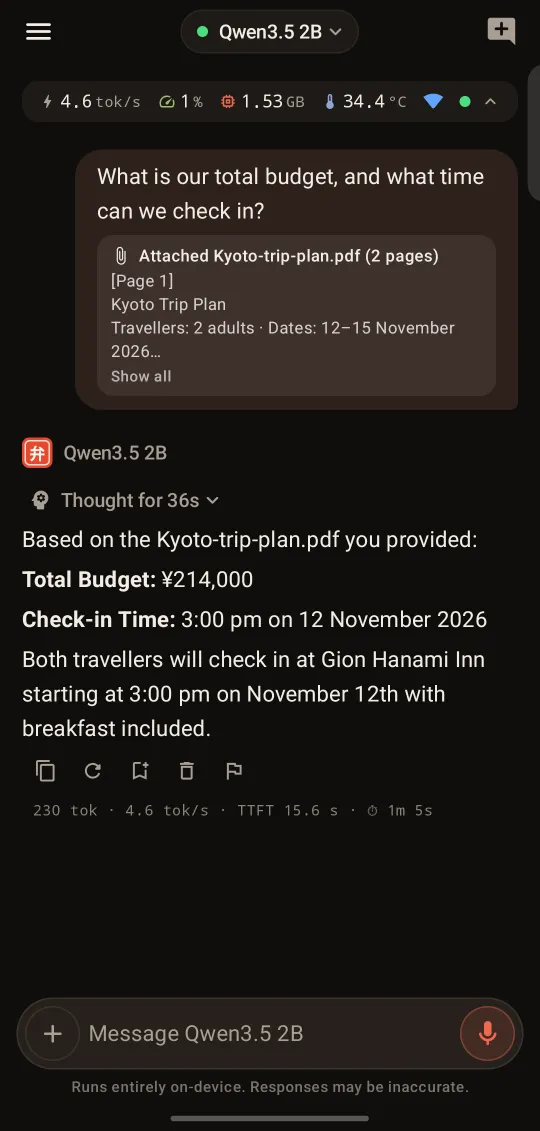
Real screenshot · Qwen3.5 2B reading a PDF on an iQOO Z10
一 Features 特長
An assistant, not a model playground.
Everything you expect from a modern AI chat, plus the one thing cloud assistants can't offer: it works with your phone's data right on your phone.
Knows your phone
"Am I free at 4?" "Pharmacy near me." "Add Rahul's new number." "Summarise this chat." BentoMind uses
typed tools for contacts, calendar, location and notifications, and you can share any text or chat
to it from other apps.
Contacts
Calendar
Nearby places
Notifications
Share to BentoMind
Web search
Calculator
Update Rahul's number to 98100 12345
Edit contact
Rahul Sharma · mobile → 98100 12345
Save this change?
CancelOK
Every edit, delete or new event asks first.
Private by default
No account, no analytics, no cloud chat. What you ask stays on your phone unless you choose to send it.
Chats & history on device
Memories on device
Model files on device
Voice audio on device
Contacts & calendar on device
Real-time metrics & a benchmark lab
Honest performance: live tokens/s, CPU, RAM and temperature while you chat, plus a benchmark lab to find
the model that suits your phone. Export results as CSV or JSON.
speed
14.1 tok/s
TTFT
552 ms
RAM
1.40 GB
temp
36.4 °C
Works offline
On a flight, in the mountains, or on a patchy connection. Once a model is downloaded, chat, local voice
input and on-phone tools like contacts and calendar work in airplane mode. No per-query cost, ever.
Airplane mode
still answering
Voice input
Speak instead of typing. Use Google's on-device recognizer, or a fully local Moonshine or Whisper model.
speech → text on your phone · from 28.5 MB
Thinking that doesn't overthink
Auto thinking reasons only when it helps (math, code, planning). A budget and loop detection stop small
models from going in circles.
OffAutoAlways
Thought for 21s
Stopped overthinking
Memory you control
Off until you turn it on. Then ask it to remember something and it saves a short, editable note on your
phone. View, edit or delete any memory at any time.
Prefers short answers
Vegetarian
Writes Kotlin at work
Gym on weekdays
Your models, your choice
Pick from 20 open-weight models sized for your phone, from 292 MB to 3.1 GB, with a device-fit badge on
each. Paste any GGUF link from Hugging Face. Or connect an OpenAI-compatible server you trust, such as
Ollama on your laptop; API keys are encrypted on the device.
On this phone
Qwen3.5 2B1.3 GB
Qwen3.5 0.8B812 MB
MiniCPM5 1B688 MB
Phi-4 mini2.5 GB
Remote · optional
Ollama on your laptop
Any OpenAI-compatible API
Keys encrypted on device
Clearly labelled when messages leave your phone
二 Use cases 毎日
Everyday help, right in your pocket.
Real things to ask today. Most of them work in airplane mode, and every card says what it needs.
Offline
On-device data
Needs internet
New
Summarize a long group chat
“What did I miss? Just the plans, and anything for me.”
Export or share the chat → Summarize
Offline
Shared to BentoMind · 214 messages
Summarize Draft a reply Dates & tasks Explain Translate
Summary: Dinner moved to Friday, 8 pm at Priya's. You're
bringing dessert. Aman needs the photos by Thursday.
Reply politely
“Help me say no to Saturday without sounding rude.”
Share the message → Draft a reply
Offline
Make sense of a bill
“What is this charge, and when is it due?”
Select the text in any app → Ask BentoMind
Offline
Ramble, get a tidy to-do list
“Uh, call the plumber, Mum's birthday is Sunday, and renew the passport…”
Tap the mic and think out loud
Offline · Voice
0:09 · transcribed on device
Call the plumber
Mum's birthday · Sunday
Renew passport
New
Read a lease, bill or report
“What's the notice period, and when is rent due?”
Attach the PDF → the text is read on your phone
Offline · PDF
Rental-Agreement.pdf · 1 page
Rent
₹28,000 a month, due by the 5th
Deposit
₹84,000, refunded within 30 days
Notice
2 months, in writing
Term
1 Oct 2026 to 31 Aug 2027
Read on the phone · airplane mode
New
Ask about a photo
“What does this sign say in English?”
Attach or share a photo, with a vision model you connect
Needs internet · Remote vision model
Plan the week's meals
“Five quick dinners for this week, and one grocery list.”
Then ask it to swap anything you don't like
Offline
Translate on a flight
“How do I say “Where is the train station?” in Japanese?”
Abroad or in airplane mode, no roaming needed
Offline
Study buddy
“Explain photosynthesis like I'm 12, then quiz me.”
Ask follow-ups until it clicks
Offline
Check your day
“Am I free at 4 tomorrow?”
Checks your calendar, right on the phone
On-device data · Calendar
Tomorrow
2:00Design review
3:00Free until 6:30
6:30Gym
Yes, you're free from 3:00 to 6:30.
Catch up after a meeting
“Who messaged me while I was in the meeting?”
Looks through your notifications, on the phone
On-device data · Notifications
Find a pharmacy nearby
“Is there a pharmacy near me?”
Searches OpenStreetMap with an area rounded to about 100 m
Needs internet · Location
Weather and headlines
“What's the weather today, and the top headlines?”
Web search via DuckDuckGo, with sources
Needs internet · Web search
Answers that remember you
“Remember I'm vegetarian.”
Turn on Memory; later recipe ideas skip the meat. Edit or delete it any time.
Offline · Memory
三 How it works 使い方
Up and running in a minute.
Step 01
Download a model
One tap. BentoMind reads your phone's RAM and recommends models that will run well, with a fit badge on every option.
from 292 MB · resumable download
Step 02
Ask anything
Type or speak. Answers stream token by token with Markdown, code, tables and LaTeX, and your history stays on the phone.
loads in seconds · works offline
Step 03
Let it use your phone, with permission
Switch on only the sources you want: contacts, calendar, location, notifications. Every change it proposes waits for your OK.
opt-in per source · OK / Cancel
四 Privacy プライベート
Private by architecture, not by promise.
The model runs on your phone's CPU, so your questions, chats and personal data are processed in your pocket. Data only crosses the line for things that need the internet, and you control each one.
No account, no chat server
There is nothing to sign up for and no BentoMind backend that sees your chats. We only receive a reply you choose to report.
No ads, analytics or trackers
No tracking SDKs in the app. Your data is never the business model.
Only the minimum, under your control
Web search sends just the query and can be switched off. Nearby places sends an area rounded to about 100 m.
Delete anything
Clear chats, memories and models in the app. Uninstalling removes everything.
Query only → DuckDuckGo, when online. Switch it off any time.
Remote model
Opt-in. Only to a server you add, labelled in chat.
Nearby places (OpenStreetMap), model downloads (Hugging Face) and reports you send us are also user-initiated.
五 Models & performance モデル
Real numbers from a real mid-range phone.
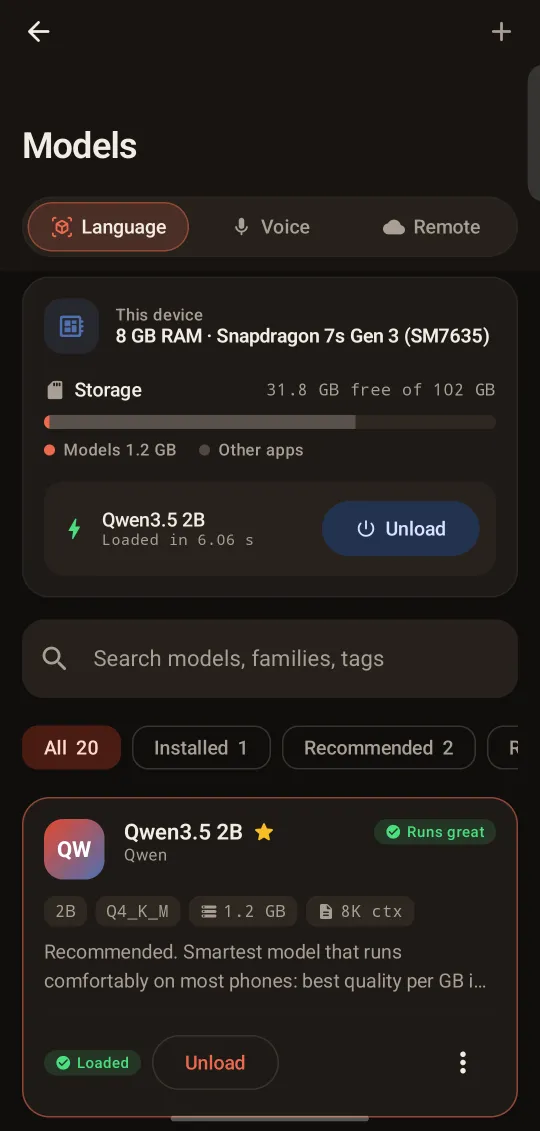
No cherry-picked flagship. Every figure below was measured with BentoMind's llama.cpp engine on an iQOO Z10 (Snapdragon 7s Gen 3, 8 GB RAM).
Decode speed, higher is betterPrompt processing, higher is betterTime to first token, lower is better
Qwen3.5 0.8B Q8_015.4184422
MiniCPM5 1B Q4_K_M14.1115552
LFM2.5 1.2B Instruct Q4_K_M14113580
Qwen3.5 2B Q4_K_M9.878n/a
MiniCPM5 2B Q4_K_M6.7451128
Q4_K_M / Q8_0 GGUF. MiniCPM5 and LFM2.5: benchmark lab, 4 threads, 4 Oct 2026. Qwen3.5: llama-bench with
the app's 4 prompt / 3 decode threads, 10 Oct 2026. *In a real chat, Qwen3.5 2B (the default on 6 GB+
phones) streams at about 7.6 tok/s. Decode speed is limited by memory bandwidth, so smaller files are faster.
7.6 tok/s
Qwen3.5 2B in chat, up from 4.7
28.5 MB
smallest on-device voice model (Moonshine Tiny)
Need more power?
Point BentoMind at your own GPU. Qwen3.5 4B via Ollama on a GTX 1650 laptop streams at
~38–44 tok/s over Wi-Fi.
20 models in the catalog292 MB – 3.1 GB
Qwen3 / Qwen3.50.6B – 4B
MiniCPM51B, 2B
Gemma 3 / Gemma 4270M – E2B
LFM2.5350M – 2.6B
Llama 3.21B, 3B
SmolLM33B
Phi-4 mini3.8B
DeepSeek-R1 Distill1.5B
Granite 4.01B
Full benchmark table
Benchmark results on iQOO Z10, Snapdragon 7s Gen 3, 8 GB RAM
Model
Quant
File
Generation tok/s
Prompt tok/s
First token
Peak RAM
Qwen3.5 0.8B
Q8_0
812 MB
15.4
184
422 ms
—
MiniCPM5 1B
Q4_K_M
688 MB
13.8–14.4
112–118
552 ms
1.40 GB
LFM2.5 1.2B Instruct
Q4_K_M
731 MB
13.5–14.4
101–125
541–622 ms
1.72 GB
Qwen3.5 2B
Q4_K_M
1.3 GB
9.8*
78
—
1.2 GB
MiniCPM5 2B
Q4_K_M
1.6 GB
6.4–7.0
39–50
1128 ms
—
六 The app アプリ
Built for everyday use.
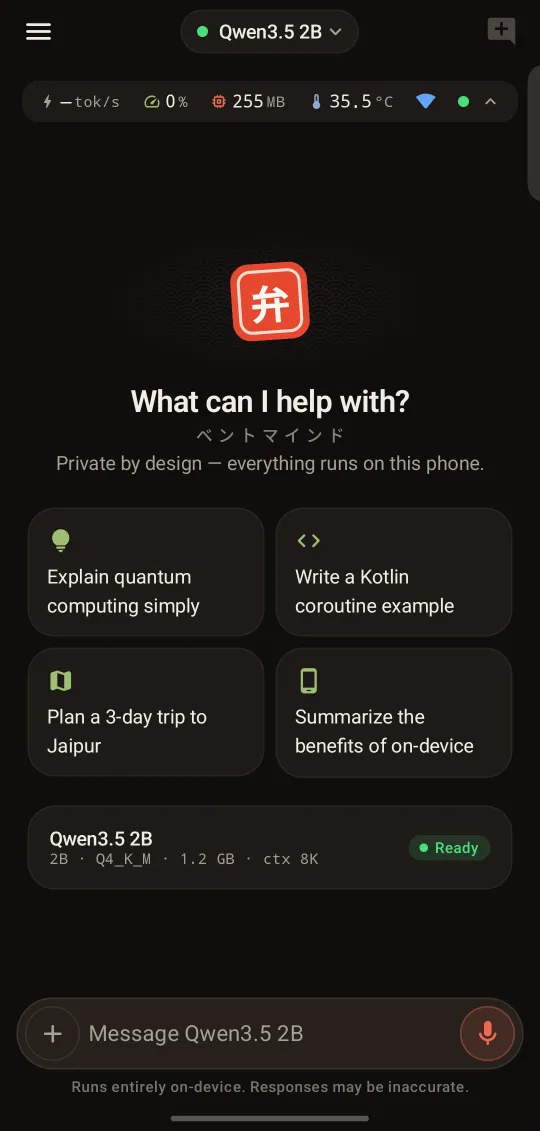
Real screenshots from BentoMind running on an iQOO Z10.
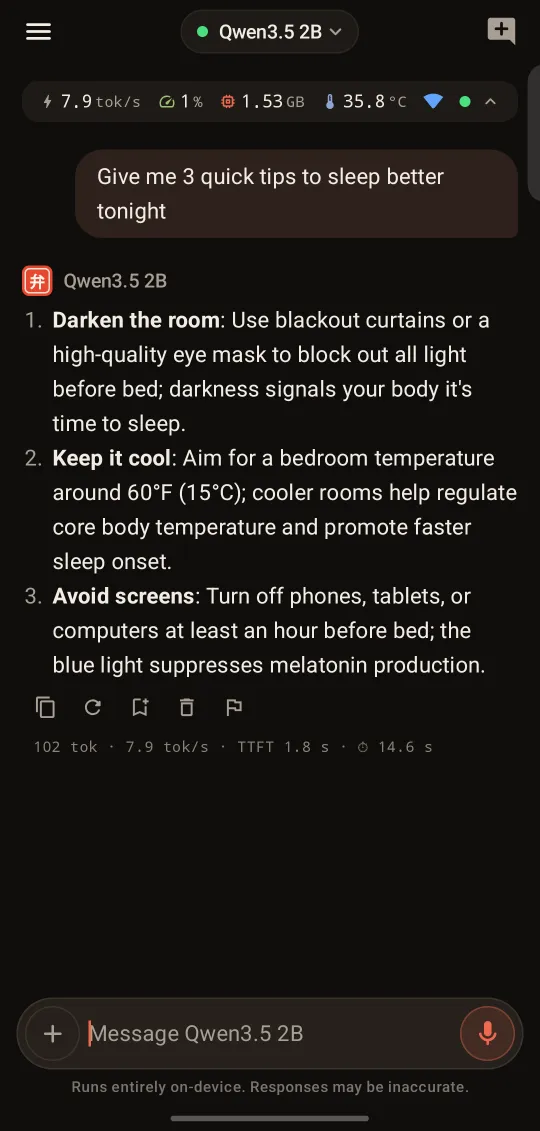
Chat
Answers stream in from the phone's own processor.
PDF answers
Budget and check-in time pulled from a trip plan by a 2B model.
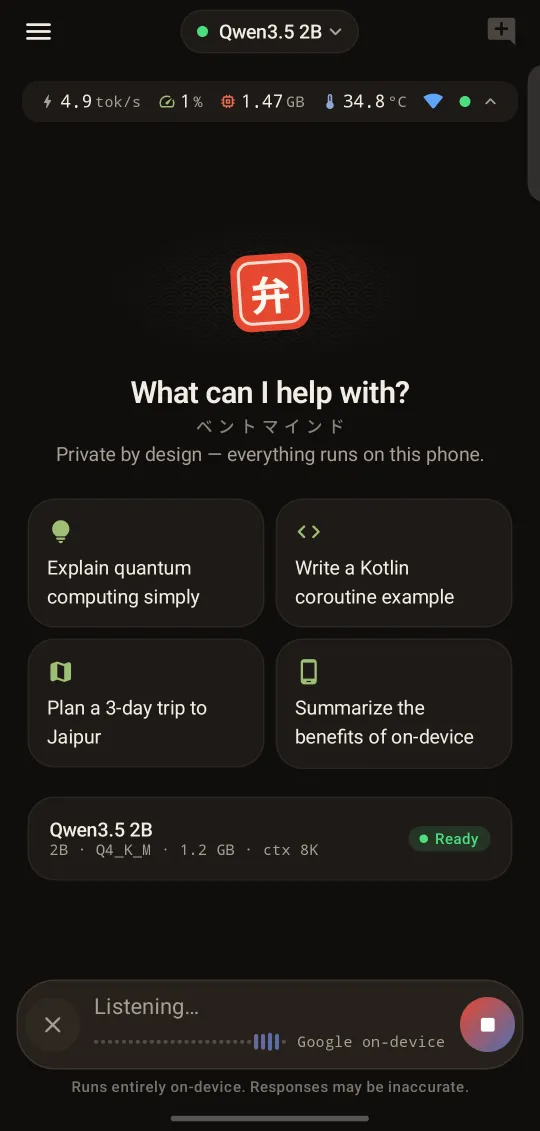
Voice input
Speak instead of typing; recognized on the device.
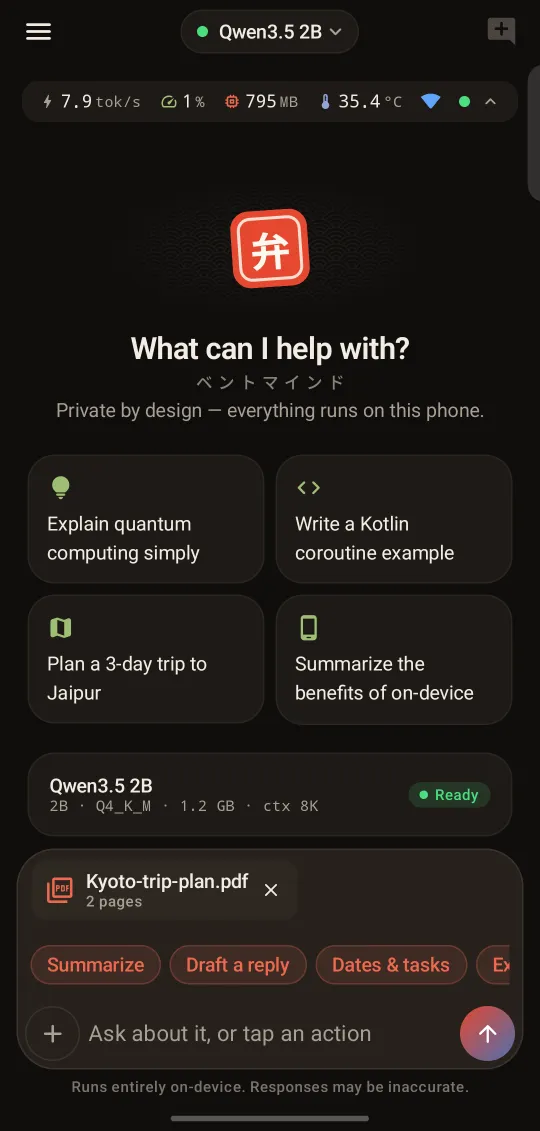
One-tap actions
Summarize, draft a reply or pull out dates from any file.
Fits your phone
Storage, RAM and load time for the model you run.
Start screen
A clean start, with live metrics up top.
Chat
Answers stream in from the phone's own processor.
PDF answers
Budget and check-in time pulled from a trip plan by a 2B model.
Voice input
Speak instead of typing; recognized on the device.
One-tap actions
Summarize, draft a reply or pull out dates from any file.
What is an on-device LLM, and why run one on your phone?
An on-device LLM (large language model) is an AI model that runs locally on your phone's own processor instead of on a company's servers. BentoMind runs open-weight local LLMs such as Qwen, Gemma and MiniCPM with llama.cpp, so your prompts and answers stay on the phone unless you choose to send them, it works without internet, and there are no usage limits, accounts or subscriptions.
Is BentoMind a private ChatGPT alternative?
For everyday tasks, yes: chat, summarize, rewrite, translate, brainstorm and ask about your own files, all on your phone and without an account. Phone-sized models (around 1–3B parameters) know less than big cloud models like ChatGPT, so for heavy tasks you can connect your own remote model; those chats are clearly labelled.
Can it read PDFs, photos and files?
Yes. Tap + → Files (or share a file from another app) and BentoMind reads the text of PDFs, .txt, CSV and code files on your phone, so it works with any model, even offline. Text extraction from PDFs needs Android 15 or newer; on older phones, and for scanned PDFs, the first pages are sent as images to a vision model instead. Photos need a vision-capable remote model you connect, such as one running in Ollama or LM Studio; on-device models are text-only for now. BentoMind only gets the files you pick or share, and asks for no storage permission.
How do I share something to BentoMind?
Use the Share button in any app (WhatsApp, Gallery, Files, Chrome…) and pick Ask BentoMind or BentoMind, or select text anywhere and choose Ask BentoMind from the menu. A new chat opens with it attached, with one-tap actions like Summarize, Draft a reply, Dates & tasks and Translate.
Is it really offline?
Yes. After you download a model, chat runs entirely on your phone's processor, and so do local voice input and on-phone tools like contacts and calendar. Try it in airplane mode. Only the features that need the internet (web search, nearby places, remote models, downloading models and sending a report) need a connection.
Which phones does it support?
Today: Android 9 or later on a 64-bit (arm64) phone. We recommend 8 GB of RAM; 6 GB works well with small models (about 1.5 GB or less). On first run BentoMind suggests Qwen3.5 2B on 6 GB+ phones and Qwen3.5 0.8B on phones with less RAM. The app shows a fit badge on every model so you know what will run well. Our reference device is an iQOO Z10 (Snapdragon 7s Gen 3, 8 GB).
Is there an iPhone (iOS) version?
Not yet. BentoMind is in early access on Android first, and an iOS version is planned with the same promise: private, on-device and fully offline. Join early access and we'll tell you when it's ready.
What data does it access?
Only what you switch on in Settings → Permissions: contacts, calendar, location and notifications. BentoMind never asks for your SMS inbox or call history. Data is read on your phone only when you ask a question that needs it, and it is never uploaded. Any edit, delete or new event needs your OK first. See the privacy policy for details.
Is it free?
Yes, early access is free, and there is no account or subscription to sign up for. We may add optional paid extras later, but there will be no ads and your data will never be the business model.
Why isn't it on the Play Store yet?
BentoMind is in early access while we test it on more phones and finish Google Play's review. Want to try it now? Request early access and we'll send you the APK (about 20 MB; models download separately in the app).
Can I use my own server or models?
Yes. Paste any GGUF model link from Hugging Face to run it on-device, or add any OpenAI-compatible endpoint (for example Ollama or LM Studio on your computer, or a hosted API). API keys are encrypted with the Android Keystore, and chats that use a remote model are clearly labelled because those messages go to that server.
An AI that lives on your phone, not in someone's cloud.
BentoMind is in early access on Android. Tell us your phone model and we'll send you a build.